Token Sniffer Alternatives (2026)
TokenSniffer cleared a token? That's step one. Here are 5 tools to run next, covering liquidity, holders, community, dev, and full audits.
TokenSniffer is the most-used token scanner. Its smell test is thorough within its scope. The problem is scope.
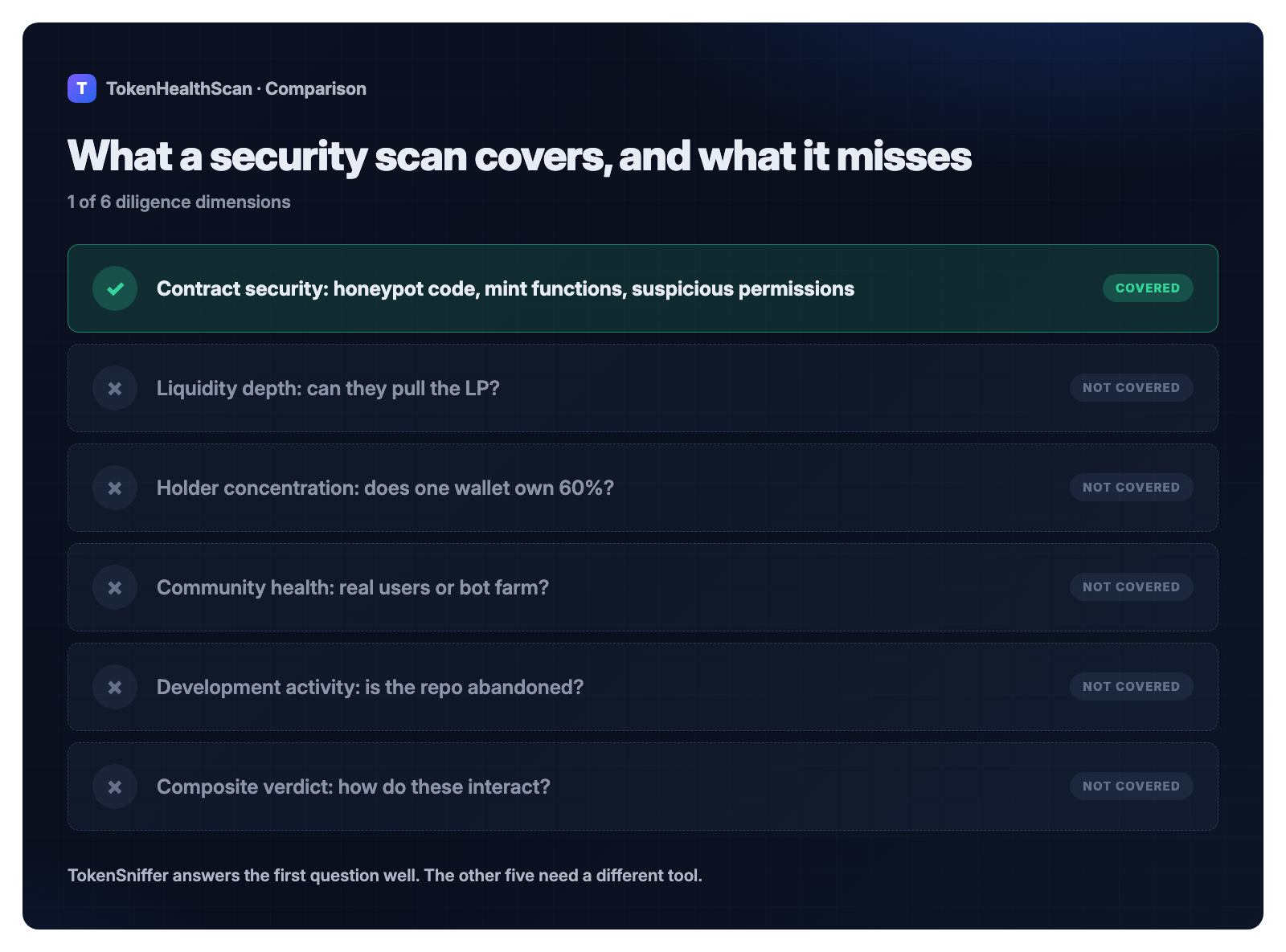
TokenSniffer answers: "Is this a scam? Does it have honeypot code? Are there suspicious functions?" Those are critical questions. But they're not the only questions that matter.
If a token passes TokenSniffer, it means the contract is clean. That's 20% of the diligence. The other 80% is: "Does the founder own 90% of the supply? Is all the liquidity locked, or can they pull it in 48 hours? Is GitHub abandoned? Is the Telegram a bot farm?"
This guide covers five tools designed to fill the gaps after TokenSniffer clears a token. We tested them on real-world tokens and verified their data sources. Each section below leads with the specific gap that tool closes, not just a feature list — for the full side-by-side comparison with every report screenshot, see Best Token Scanners in 2026, the hub article for this cluster.
Why TokenSniffer Isn't Enough
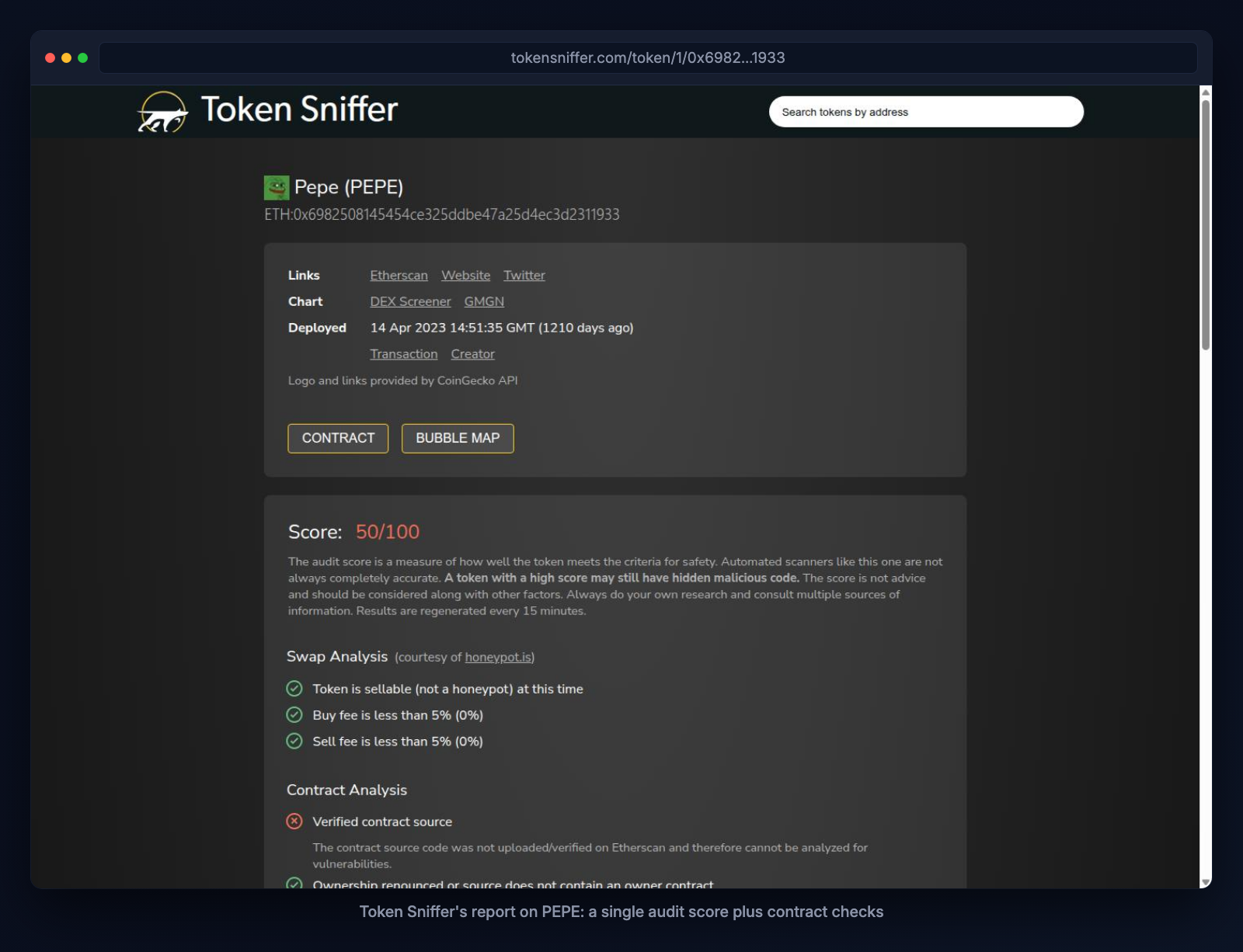
TokenSniffer excels at one job: detecting scam contract patterns. It runs on 15 chains. It maintains a 55+ million token database. It's free.
But these are its boundaries:
TokenSniffer checks only contract code. It doesn't measure liquidity depth (can the founder pull all LP in seconds?), holder concentration (is one wallet 60% of supply?), social health (is the Telegram growing or shrinking?), or development status (are commits active?).
TokenSniffer has a binary output. Scam or not scam. If a token is clean but has 2% daily sell volume and 80% whale concentration, TokenSniffer returns a thumbs-up. Your job is to decide if that's actually acceptable (it usually isn't).
TokenSniffer is not a buy/hold/sell recommendation. It's a hygiene check. Clean contract code doesn't equal a healthy token.
De.Fi published a blog post in 2023 titled "Token Sniffer Alternative: Using the De.Fi Scanner." The fact that a competitor openly targets the "sniffer alternative" search intent tells you this gap is real. De.Fi saw an audience looking for what to run after TokenSniffer. We did too.
1. Need Wallet-Approval Scanning Across 40+ Chains? Use De.Fi
De.Fi combines contract scanning (similar scope to TokenSniffer) with a unique angle: wallet-level approval management. If TokenSniffer clears a token's code, De.Fi's Shield product lets you audit whether you've accidentally approved malicious smart contracts to access your tokens.
Strengths:
- Broadest chain support in this category: ~40–45 networks via Shield approval scanning (vs. TokenSniffer's 15).
- The only tool pairing contract scanning with approval revocation. You can revoke permissions in one click instead of managing Revoke.cash or manually calling the contract.
- Integrated into CoinGecko, GeckoTerminal, QuickSwap, SushiSwap's own contract-analysis displays. So De.Fi data reaches users who never visit de.fi directly.
- Non-custodial, no wallet connection required to view results.
Tradeoffs:
- De.Fi's own website is blocked to automated scraping, so we had to source this research from De.Fi's 2023 blog post and a third-party review from July 2026. Treat De.Fi pricing and exact feature lists as potentially dated. We recommend checking de.fi directly in a browser before relying on any claim about their Scanner PRO tier or exact chain coverage.
- Pricing for premium tiers is not published. The company quotes custom pricing upon inquiry.
- Self-reported chain counts are inconsistent across De.Fi's own materials (40–45 for Shield, 41 for API, 8 explicitly named for Scanner on EVM).
Use after TokenSniffer if: You want to audit your own wallet's token approvals on dozens of networks at once. *(See De.Fi's report screenshot in the full comparison.)*
2. Need the Cheapest Multi-Chain Paid Tier? Use Quick Intel
Quick Intel's core product is contract scanning ($0–$12.99/mo tiers). The "contract-reuse detection" feature is unique: it flags when a contract has been used on multiple tokens or chains, which often signals low-effort token mills or Frankenstein clones.
Strengths:
- $4.99/mo is the cheapest paid scanner in this entire category (vs. TokenSniffer API at $99/mo, Token Health Scan at $20/mo, GoPlus at $199/mo).
- "Similar & Exact Contracts" detection is genuinely distinct. It catches copy-paste token farms.
- Multi-surface access: web, Telegram bot, Discord bot, iOS, Android. Way more distribution than TokenSniffer's web-only interface.
- 30+ chain support (tied with GoPlus, beating TokenSniffer's 15).
- ShadowShield AI layer outputs an AI-estimated scam probability as a percentage, so you get both a yes/no flag and a confidence estimate.
Tradeoffs:
- In-app tiers ($0, $4.99, $12.99) do not include API access. Developer API pricing is separate and unpublished.
- Pricing page itself flags two tiers as "not finalized," so treat current pricing as provisional.
- The top tier (All Access Pro) is newly listed, token-gated, and mirroring DEXTools' hold-a-token model. You may need to buy a token to access it.
Use after TokenSniffer if: You're scanning tokens across 20+ chains and want to catch low-effort clones at the cheapest price point.
3. Need AI-Agent Security or 40+ EVM Chains? Use GoPlus
GoPlus is a decentralized security platform that goes beyond token scanning. The core product is Token Security Detection, but in 2026 it's shipping dedicated AI-agent security (AgentGuard and DeepScan), which is adjacent to what you're doing if you're auditing any kind of automated system (not just tokens).
Strengths:
- 40+ EVM chains plus separate Solana and Sui coverage. Covers emerging L2s (Monad, Berachain, Unichain) before competitors do.
- API powers DexScreener's security layer and is integrated into OKX. Third-party endorsements are strong trust signals.
- AI-agent security products (AgentGuard for prompt-injection detection, DeepScan for AI-powered audits) are 2026-specific differentiators. No other scanner in this list offers dedicated agent-skill security.
- Free tier includes 150K API Compute Units per month.
Tradeoffs:
- $199/mo baseline pricing is expensive for teams on a budget.
- Security-detection focus only. No liquidity, tokenomics, community, or development sub-scoring on the public console.
- GoPlus's own disclaimer: "there is no 100% guarantee... this is only used as a reference, not as a basis for contract judgment." Narrower liability framing than a comprehensive health score.
Use after TokenSniffer if: You're already building on 20+ chains, or you're integrating token-risk checks into AI agent workflows. *(GoPlus's report screenshot is in the full comparison.)*
4. Scanning Solana? Use RugCheck
RugCheck is Solana(+Fogo)-native and deeply embedded in the Solana trading ecosystem (Jupiter, Raydium, Dexscreener, Solscan integrations). The signal here is not just the scan output, but the explicit no-token-no-conflict positioning.
Strengths:
- Deep Solana ecosystem integration. Solana traders encounter RugCheck data inside Jupiter, Raydium, and other tools they already use.
- Explicit neutrality pledge: "RugCheck has no token of its own... our goal is to protect you from rug pulls, period." No financial incentive to bias results, unlike DEXTools (DEXT-gated Premium).
- Bulk-report API (1,000 tokens in one batch request) built for algorithmic trading and AI integrations.
- Free tier: $0/mo at 3 requests/sec. No login required.
- Fogo chain support is the newest product expansion (2026).
Tradeoffs:
- Solana + Fogo only. Zero EVM support. If you're on Ethereum or Polygon, RugCheck can't help.
- Single risk-score output. No separate tokenomics, community, or development sub-scores visible on public pages.
Use after TokenSniffer if: You're scanning Solana tokens. RugCheck has the deepest Solana integration of any tool. *(RugCheck's report screenshot is in the full comparison.)*
5. Need All Five Health Dimensions in One Scan? Use Token Health Scan
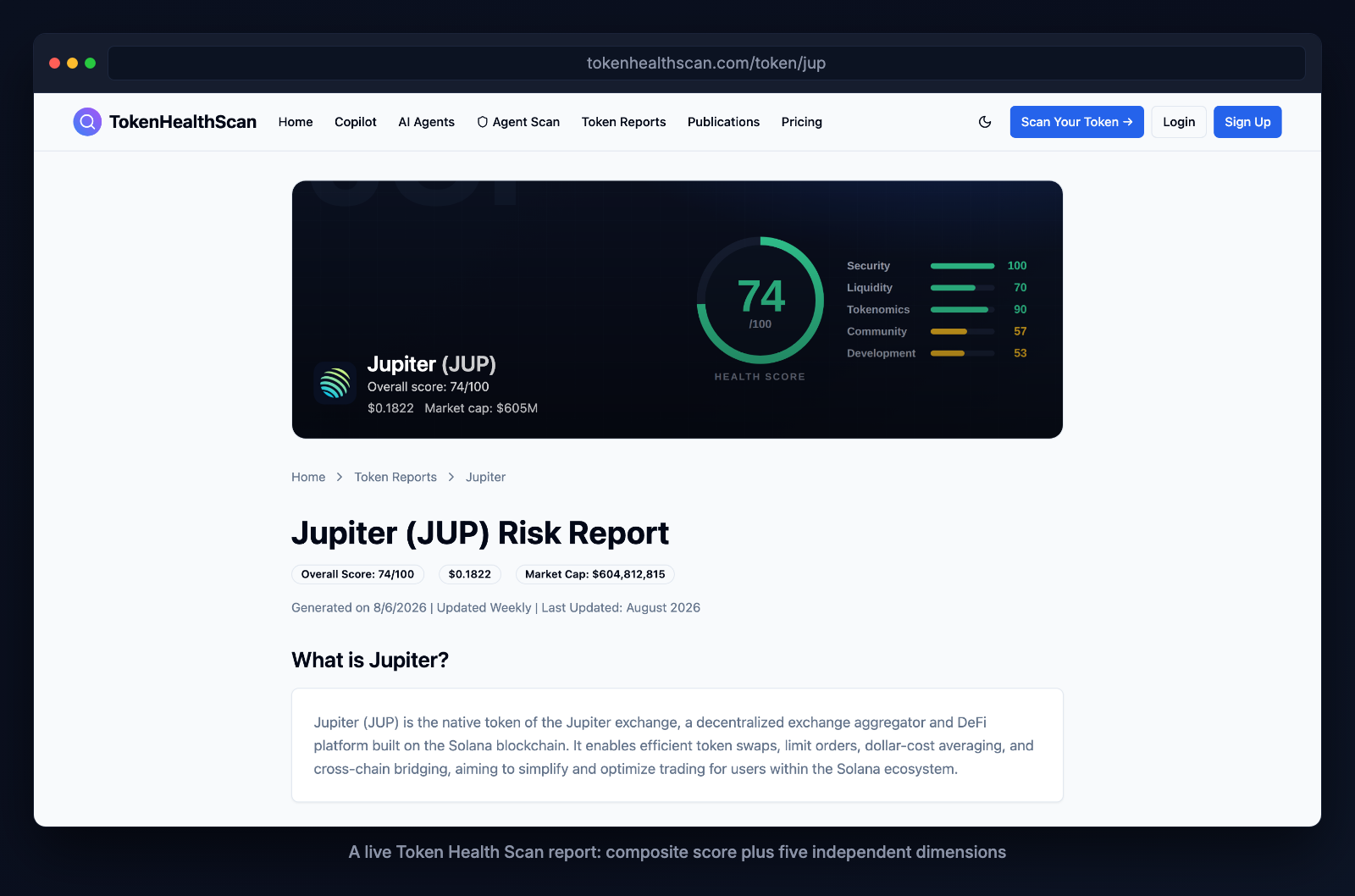
Token Health Scan fills the gap by design. It answers questions TokenSniffer doesn't: liquidity depth, holder concentration, community growth, and GitHub activity. The output is a 0–100 health score across five dimensions, plus a prioritized remediation checklist.
Strengths:
- Five-dimension composite score. One scan returns Security, Liquidity, Tokenomics, Community, and Development sub-scores plus an overall health score. No tool in this category combines all five.
- Remediation checklist is actionable. Instead of "your token scored 42/100," you get "fix top holder concentration, improve liquidity depth, and launch GitHub commits" ranked by impact on the score.
- AI Agent (ERC-8004) Trust Scoring. Token Health Scan also audits AI agents, not just tokens. Useful if you're building agentic-commerce or AI-wallet features.
- Free tier: 3 lifetime scans. Enough for basic checks.
Tradeoffs:
- 5-chain support (Ethereum, Base, Arbitrum, Solana, Polygon). Narrower than GoPlus (40+), Quick Intel (30+), De.Fi (40+). If you need other L2s or BSC, you'll use a second tool.
- Community and development scoring rely on public APIs (Telegram, GitHub). Private Telegrams or missing GitHub repos will show as lower signals.
- $20/mo is higher than Quick Intel ($4.99) but lower than GoPlus ($199).
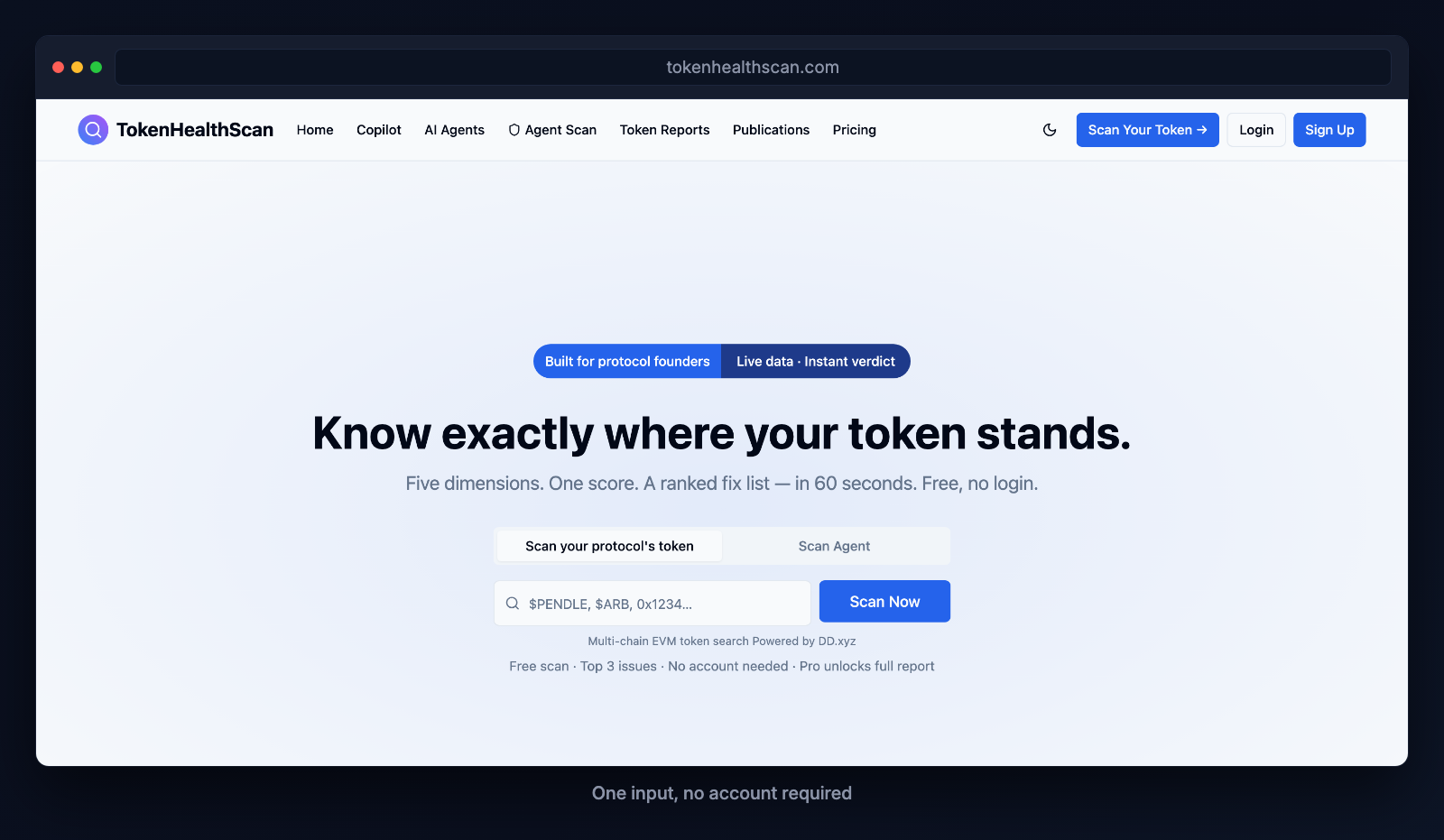
Use after TokenSniffer if: You're a protocol founder, growth operator, or investor who needs a full health picture (all five dimensions). You want actionable fixes, not just a score.
How to Pick Your Post-TokenSniffer Tool
I scan mostly Solana tokens.
Use RugCheck. It's free, embedded everywhere Solana traders go, and has no token conflict.
I'm an investor building a personal diligence routine.
Use Token Health Scan. You get all five dimensions at once and a fix list. It's faster than chaining TokenSniffer + Nansen + LunarCrush.
I scan tokens across 30+ chains and want the cheapest option.
Use Quick Intel ($4.99/mo). It covers 30+ chains and its contract-reuse detection catches low-effort clones TokenSniffer might miss.
I'm integrating token-risk checks into an automated system (bot, wallet, agent).
Use Token Health Scan (API, $20/mo) or RugCheck (free API, Solana-only). Quick Intel if you need multi-chain. GoPlus if you also need AI-agent security features.
I need wallet approval management + contract scanning.
Use De.Fi. It's the only tool combining both. Chain support is the broadest of any tool researched.
I want to cover every possible attack vector.
Run TokenSniffer first (security check). Then run Token Health Scan (full dimensions) or, for Solana, RugCheck (ecosystem-native). If you're paranoid, add Quick Intel for contract-reuse detection.
Frequently Asked Questions
Do De.Fi and Token Health Scan compete for the "Token Sniffer Alternative" keyword?
Yes. De.Fi published a blog post in 2023 explicitly titled "Token Sniffer Alternative: Using the De.Fi Scanner." That's a direct play for this exact search intent. Both De.Fi and Token Health Scan position themselves as what to run after TokenSniffer. They compete honestly on different features: De.Fi wins on chain breadth (40+ vs. 5) and wallet approval management; Token Health Scan wins on the five-dimension composite score and remediation checklist.
Is TokenSniffer really "free" if the API costs $99/mo?
Yes, both are true. The web app is free forever — no login, no signup, unlimited use. The API is $99/mo. If you're using the web scanner, TokenSniffer is free. If you're embedding it into a dashboard or bot, it costs money like any other commercial API.
Can I run all five alternatives on one token?
Technically yes. But practically, no. Each tool has different data quality on different chains and different updates. Pick 1–2 based on your needs (TokenSniffer for security, Token Health Scan for full dimensions, RugCheck for Solana-native). Running all five is overkill and slows you down.
What if Token Health Scan disagrees with TokenSniffer's security score?
It's possible. Token Health Scan's "Security" dimension is one of five sub-scores. TokenSniffer's "smell test" is a single-purpose security detector. If TokenSniffer flags a contract as clean but Token Health Scan's Security sub-score comes back weak, trust the specialized detector (TokenSniffer) for pure security. Then investigate why Token Health Scan's other dimensions (liquidity, tokenomics, community) are low — that's where the real problem likely is.
Which tool is fastest?
Token Health Scan and RugCheck return results in 5–15 seconds. TokenSniffer is similar. GoPlus is similar. Quick Intel and De.Fi depend on network congestion but are usually fast. All are much faster than manual due diligence.
Can I use these tools on a mobile phone?
Quick Intel has iOS and Android apps. Most others (TokenSniffer, Token Health Scan, RugCheck, De.Fi, GoPlus) are web-only. Some traders use Telegram bots to access scanners on mobile (Quick Intel, RugCheck, and others ship Telegram bot integrations).
The Full Scanner Landscape
For a complete comparison of all 7 scanners plus Token Health Scan, see Best Token Scanners in 2026 (7 Tools Compared) — the hub article for this cluster.
Explore the Cluster
- Best Token Scanners in 2026 — Comprehensive comparison of all tools.
- DEXTools vs Token Health Scan — Different jobs, honestly explained.
- RugCheck vs Token Health Scan (Solana) — Solana-native comparison.
- GoPlus vs Token Health Scan — Infrastructure-grade security API vs. five-dimension audit.
- De.Fi vs Token Health Scan — Wallet-approval management vs. token-level audit.
- Quick Intel vs Token Health Scan — Cheapest multi-chain option vs. remediation depth.
- Honeypot.is vs Token Health Scan — A single-purpose free gate vs. a full health picture.
- Token Scan Guide: How to Use a Token Scanner — The signals to look for.
- Token Sniffer vs Token Health Scan — Static comparison page.
See the Output for Yourself
These reports re-scan daily, so the exact numbers move. The point is the shape: five dimensions scored independently, then combined.
- JUP (Solana) — Clean contract and solid tokenomics, with community and development scoring lower. TokenSniffer would clear this token on security alone.
- PEPE (Ethereum) — Security at the top of the range, development near the bottom. Exactly the gap a security-only scan leaves open.
References
- TokenSniffer — https://tokensniffer.com
- De.Fi — https://de.fi
- GoPlus — https://gopluslabs.io
- RugCheck — https://rugcheck.xyz
- Quick Intel — https://quickintel.io
- Token Health Scan — https://tokenhealthscan.com
*Data verified from live product pages and API documentation as of August 6, 2026. Pricing and features subject to change.*